
Author name: admin

Think Cirrus/ Malware blog/Macbookpro
Blog

Mac person? If you think you’re exempt from malware, spyware or hacking… think again!

Mac person? If you think you’re exempt from malware, spyware or hacking… think again! This week at Think Cirrus Towers we’ve come across another I.T. conundrum we’d like to share. One of our clients, based in London, phoned us in a state of panic when they had discovered that they had been locked out of their Mac Book Pro. Unaware of any hacking scares or scandals, we slowly gathered intelligence as to what was causing this conundrum. We then stumbled across a piece of information about an incident recently reported in Indonesia. A number of Mac and Iphone users reported that their device suddenly locked itself. This is a common problem, right? Wrong – these users, didn’t have a passcode to begin with. Such incidences were aired on Thursday 10th August via Twitter’s Indonesian hashtag, Cuitan, which highlighted the trending problem. According to MakeMac.com – the top Indonesian Apple review site, the unusual condition experienced by iOS users was ‘Lost Mode’, while Mac users experienced ‘EFI’ Lock. Allegedly these problems were due to a hacking attack. How have the hackers gained access? It seems to us that the hacker has managed to acquire the Apple ID and have stolen the victim’s password. With their details, the hacker can then access their icloud and use the ‘Find my iPhone/Find my Mac’ feature, thus being able to essentially disable to device. How do you get your device unlocked? The hackers, always in want of some cash, have created a set of instructions which means that the victim is required to email help.apple@gmx.com – which is not an official Apple address. Once contacted the hacker will request a ransom of $50 US dollars. After the exchange of funds, a unique code will be released to enable to victim to once again gain access to their device. The workings of this malicious program are similar to ransomware, which is in charge of locking the computer or victim’s documents, then requesting a ransom (usually in the form of Bitcoin) if the victim wants to get a unique code to unlock the device. How did they acquire usernames and passwords? It is not known exactly what hackers use to steal their Apple ID casualties, but MakeMac alleges hackers are using phishing alias techniques to get victim information. We’re not entirely sure whether this hacking scandal is fake news or not, however what we do know is that one of our clients has experienced it and we know that the moral of the story is that you can’t be too cautious. Change your passwords regularly, update your operating systems and change your security settings. We know it sounds simple – but sometimes these are the best preventative measures.

Think cirrus/British airwaysblog/alexcruz
Blog

British Airways IT Systems Failure – 7 incidences and 2 years of misery for customers.

Here at Think Cirrus, we’re surprised at how many problems BA are experiencing. We know that problems and glitches are inevitable and unpredictable, however, dealing with the problems are imperative for such a well-known brand.   An international business operating in over 200 airports across the world, and 2 years on they are still experiencing IT incidences due to their new system FLY. In this blog post, we’ll discuss what has been reported upon so far as well as potential preventative measures. Simple Facts Scouring the internet for facts and figures hasn’t been easy. Buzz words and phrases such as ‘cyber-attack’ and ‘outsourced IT to India’ have dominated the headlines within more news articles and content than we care to share. So, for us to form a well-rounded opinion we needed to understand the timeline of events: October 2015 – BA Launches new system FLY June 2016 – shortly after the FLY systems was fully installed, it stopped working due to an IT glitch. July 2016 – IT incident One July 2016 – IT incident Two July 2016 – IT Incident Three May 2017 – BA’s global computer network shut down after a power outage causing hundreds of flights to be delayed or cancelled. With the problem running on for several days, with flights cancelled from Heathrow and Gatwick over the bank holiday weekend and half term. 3rd August 2017– BA were unable to check in bags and print off boarding passes for over an hour as IT system ‘went down’ The FLY Check in system has crashed 7 times since BA finished installing it at over 200 airports last year. Alex Cruz – ‘No Evidence of cyber attacks’ Alex Cruz the Chairman and CEO, made the decision to axe 700 IT workers and outsource IT services to India. Critics say that this decision has cost him dearly and had contributed to the issues that BA customers are painfully experiencing. He was asked savagely by the press whether he should resign and that got us thinking – how qualified is Alex to make decisions about outsourcing IT provisions for such a large organisation. Alex Cruz – No use in my resigning Alex Cruz – the CV Alex began his professional career at American Airlines in 1995, spending half his 10 years at the group with its travel technology arm, Sabre, in London, working with a range of European airlines. In 2000, he became a partner at Arthur D Little before setting up his own aviation consulting firm in 2002. In 2005, he joined Accenture as its head of aviation. In 2006 he founded Clickair, a Barcelona-based airline, merging the airline with Vueling in 2009 and becoming Vueling’s Chairman and CEO. Vueling was acquired by International Airline Group (IAG) in 2013, with Alex joining the IAG Management Committee. In April 2016, Alex was appointed Chairman and CEO of British Airways. From the summary above It seems Alex does have some extensive experience in the world of aviation technology.   What is FLY? And why is it causing problems? Exploring the Amadeus Altéa Departure Control System Amadeus Altea Customer Management Solution – Part 2 FLY is a bespoke departure control and customer management solution – which helps airlines to effectively manage their passengers as well as their aircrafts. It’s neat and it seems to be effective on paper, but has been a nightmare.  Back in 2012 – the Amadeus Altea system crashed because of a Linux bug, but no such claims have been made recently. So, I guess we’ll never know why the crashes happened? Will we? Home Office Systems affected too? A computer glitch at British Airways managed to take the entire Home Office no fly list off-line – and it was two days before it could be fixed. Summary A spokesperson from BA said: ‘Our worldwide check-in System has been in place since last summer and so far, more than 50 million customers have used it successfully…’ So, from our analysis, it seems that the Altea Fly system, which is managed by Amadeus IT, with its Head Quarters in Madrid, are to blame for BA’s crashes. Right? A simple management system which is so vital to the operations of many significant air lines around the world, use the same system. Which also begs the question – are they monopolising the  market? Is this healthy? So, Amadeus, the IT solutions company; are they really to blame? Are we a country of prejudice reporters and journalists if we jump straight to the conclusion that outsourced Indian IT support is to blame? Final Thought – Preventative Measures Is this a classic tale of system updates? Yes, we agree that when a new system is implemented some teething glitches are to be expected, however two years down the line, these are no longer valid reasons for system failures. It seems that regular testing and updating could be the issue. Now supporting the airline industry isn’t easy because it is a 24-hour service. Which begs the question – when do you get the time to update without disruption to services? That’s inevitable, right? So, could BA plan delays? Would more planned communication help? What happens when it is completely unexpected? Do we continue to suffer? We’ve decided that there isn’t a clear answer here. Sometimes technological glitches just can’t be predicted.  However, brand damage has been significant – so is this another job for the communications team? So many questions – not enough answers. And on that note – we’re going to carry on with our day jobs and hope that BA don’t suffer in the long run and their customers don’t suffer either.

Think Cirrus/Blog/PCIDSS
Blog

Run a restaurant, hotel or shop? Do you transmit cardholder data? Are you compliant? MUST READ!

Are you PCI DSS compliant? Do you have a PDQ machine that transmits customer data? Then this post is an absolute must read. One of our regular clients asked us recently to assist them with their PCI DSS  self assessment questionnaire with AIB merchant Services.  They needed some technical questions answered and this is where we stepped up.  Once we completed the assessment, planned in further attestations and reviews, we thought we’d let you know how important it is to understand what you need to do and why! We’re sure that you would have heard of this before and certainly come across it – if you don’t already have a system in place. But for those you who aren’t quite sure, we’ve gone into it in a little more detail. Maintaining Payment Security – what is PCI? The Payment Card Industry Data Security Standards help protect the safety of card transaction data. They set the operational and technical requirements for organisations accepting or processing payment transactions, and for software developers and manufacturers of applications and devices used in those transactions. Maintaining payment security is serious business. It is vital that every entity responsible for the security of cardholder data diligently follows the PCI Data Security Standards. Why you must meet PCI DSS requirements The full requirements of the PCI DSS must be met if you are not using a hosted solution. If the card payment application is in the merchant environment or, if the code that links to the hosted payment page is integrated into a merchant’s shopping cart, it is recommended that as well as doing the indicated checks, steps are taken to enhance the continuous security of your website and to help mitigate the risk of compromise to card and personal data. Merchants can complete a questionnaire called a ‘Self-Assessment Questionnaire’ (SAQ), if they process less than ‘x’ card transactions per year. ‘X’ can be confirmed by the merchant.. Where appropriate, software also has to conform to Payment Application Data Security Standard (PA-DSS) requirements. PCI SECURITY How to Secure Following guidance in the PCI Data Security Standard helps keep your cyber defences primed against attacks aimed at stealing cardholder data. See useful links  Assessing the Security of Your Cardholder Data Most small merchants can use a self-validation tool to assess their level of cardholder data security. The Self-Assessment Questionnaire includes a series of questions for each applicable PCI Data Security Standard requirement. There are different SAQs available for a variety of merchant environments. See useful links The PCI DSS requirements Regardless which annual method of attestation is completed, the following activities are required. These actions need to be done EVERY year. If you don’t continue to do this, you will not maintain on-going compliance. Scans have to be undertaken on a quarterly basis. Complete the annual Risk Assessment on the environment where the card data is handled or touches the cardholder environment. Ensure third parties that store, process and/or transmit card data or are connected to the cardholder environment provide evidence that they have maintained their PCIDSS compliance and are still registered with the Card Schemes. If using a third party payment application in your environment, you must ensure the product and the particular version you are using is PA DSS compliant and that the guidelines provided by the supplier are fully adhered to. If you use an integrator to bring the products together, ensure they are certified to the X standard to do so. Train your staff to follow PCI-DSS procedures. You can view the PCI DSS Quick Guide to find out more about being compliant Make sure that you are only keeping data that is essential and ensure it is encrypted and/ or masked. Monitor and control access to your e-commerce environment (i.e. make sure you have security controls for your e-commerce environment). Protect your data network by making sure that you are using not only a firewall but also compliant and up-to-date anti-virus software. There are many anti-virus products on the market but you should purchase yours from a reputable company Ensure that the shopping cart application is patched with the most up to-date version available Network scans have to be undertaken on a quarterly basis and undertaken by an Approved Scanning Vendor (ASV) Discuss security with your web hosting provider, to ensure that they have secured their systems appropriately. Web and database servers should be hardened to disable default settings and unnecessary services. Many International system hardening standards exist such as those provided by the centre for Internet security –and merchants should encourage their web host provider to adopt these standards. See useful links. With any software or hardware that you choose to use to process transactions, the vendor should have product approval from the Payment Card Industry Security Standards Council (PCI SSC). We would recommend that you check the council lists to check the product approval. If you have any questions around being compliant, please speak to your Acquirer for assistance or give Think Cirrus a call.  Your Acquirer is the company that you have your merchant account with. Most Acquirers have programs in place to manage and support their merchants’ ongoing PCI DSS compliance and validation. If you have any questions regarding PCI DSS, please contact your acquirer bank. Useful Links https://www.pcisecuritystandards.org/pci_security/ http://www.cisecurity.org/benchmarks.html https://www.pcisecuritystandards.org/pci_security/maintaining_payment_security https://www.pcisecuritystandards.org/pci_security/completing_self_assessment  

Think Cirrus/young lady on mobile phone with a cup
Blog

Use FREE Guest Wi-Fi to Market your Venue! Find out how!

Offering free guest Wi-Fi can help with the marketing of your business like never before. You’ll get to understand who your customers are and entice them to visit  with personalised incentives, resulting in real benefits to your business and your customers. We can make your Wi-Fi work smarter, not harder for you. We can enable you to gather valuable data, drive email marketing campaigns, push notifications and we can even create splash pages. After speaking to organisers at the Coffee Shop Innovation show – we know the hot topic of 2017 is Wi-Fi Analytics. Tech in the hospitality industry is developing like never before.   You can make your Wi-Fi work smarter for you! Gather real-time visitor demographics Customised guest Wi-Fi data capture pages Monitor your Wi-Fi with cloud technologies Safe and secure login via social media.     Driving loyalty We support a number of venues with uber hipster interior design and working spaces. Which means that the coffee shops/venues are slowly and unknowingly becoming co-working spaces. We have recently helped the business owner track the number of entrepreneurs casually working in the venue, and as a result, we have helped to entice them to work in the venue more. The longer they stay on great Wi-Fi the more coffee they’ll purchase. The platforms we use with various partners will save customers details allowing you, as the business owner, to make the experience a personalised one. So, whenever they pop in, you’ll not only develop a face to face relationship, but a Wi-Fi one as well. Holistically, they’ll feel like they are working from home or even better – their own office. Which means they won’t have to continually log on every time they visit. In essence, we believe that making people’s lives easier and more comfortable will drive loyalty like never before. Harnessing the Power of Social Media  Social media is slowly becoming more popular then spending real time with friends. And even when you’re with friends, you’ll want to tell the world about it. Some of our clients have already learnt so much about their customers which has helped them to improve their marketing by 50%. They have been able to see customer analytics like never before, such as, age gender and location. We have a number of clients with multiple venues and they can see which venue is busy on which days just by the Wi-Fi analytics. As we’re in Chester, events at the Racecourse really open up our eyes to how many people are uploading to instagram or sending snap chats to their friends. As part of a wider marketing campaign this can really drive traffic to your venue, just when the party atmosphere is starting. Social Media Reviews – we know that your social reviews are just as good as word of mouth reviews – so by safely logging onto social media, your guests are already primed to give you a glowing review. Customised Guest Wi-Fi We work with partners such as Volare XP, and others depending upon your wants and needs. Together we’ll create data capture or splash pages like the one shown in the picture above. This means that your customers will feel secure knowing that they are logging onto your guest Wi-Fi and this will also mean that you can keep them up to date with everything that may be happening in your world, that they won’t want to miss. You’ll be able to gather stats and analytics about your guest’s behaviour like never before.

Think Cirrus/Cyber security/National cyber security centre
Blog

What can you do to combat cyber attacks?

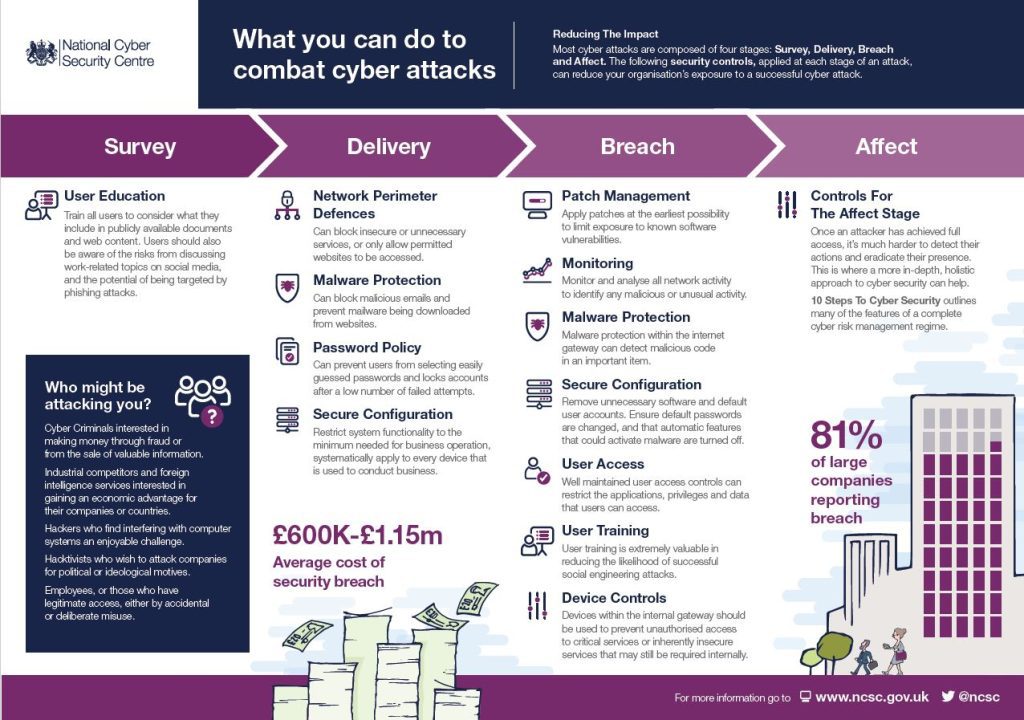
Cyber Security – Reducing the Impact According to the National Cyber Security Centre, most cyber-attacks are composed of four stages: Survey, Delivery, Breach and Affect. The following security controls, applied at each stage of an attack, can reduce your organisation’s exposure to a successful cyber-attack. We’ve used this handy guide as an outline for you to follow. See what you think. But first, a short paragraph on who might be attacking you… …Who might be attacking you? Cyber Criminals interested in making money through fraud or from the sale of valuable information. Industrial competitors and foreign intelligence services interested in gaining an economic advantage for their companies or countries. Hackers who find interfering with computer systems an enjoyable challenge.  Hacktivists who wish to attack companies for political or ideological motives.  Employees, or those who have legitimate access, either by accidental or deliberate misuse. So there are a number of reasons why your business could be targeted, how do you prevent an attack from happening. Because you should be thinking when, and not why. If you don’t take action, it’ll only be a matter of time before you experience an incident or an attack. SURVEY User Education You should look to train all users to consider what they include in publicly available documents and web content. Users should also be aware of the risks from discussing work-related topics on social media, and the potential of being targeted by phishing attacks DELIVERY Network Perimeter Defences – Make sure you can block insecure or unnecessary services, or only allow permitted websites to be accessed. Malware Protection – Make sure you can block malicious emails and prevent malware being downloaded from websites. Password Policy – Make sure you can prevent users from selecting easily guessed passwords and lock accounts after a small number of failed attempts. Secure Configuration – Always Restrict system functionality to the minimum needed for business operation, systematically apply to every device that is used to conduct business.   BREACH Patch Management – Apply patches at the earliest possibility to limit exposure to known software vulnerabilities. Monitoring – Monitor and analyse all network activity to identify any malicious or unusual activity. Malware Protection – Ensure that your malware protection within the internet gateway can detect malicious code in an important item.   Secure Configuration – Remove unnecessary software and default user accounts. Ensure default passwords are changed, and that automatic features that could activate malware are turned off. User Access – Ensure well maintained user access controls can restrict the applications, privileges and data that users can access. User Training – User training is extremely valuable in reducing the likelihood of successful social engineering attacks. Device Controls – Devices within the internal gateway should be used to prevent unauthorised access to critical services or inherently insecure services that may still be required internally.   AFFECT Controls for The Affect Stage Once an attacker has achieved full access, it’s much harder to detect their actions and eradicate their presence.  This is where a more in-depth, holistic approach to cyber security can help. We also came across this inspirational TED TALK by cyber security geek – James Lyne. Well worth a watch.

Think Cirrus/Blog/ Facebook security tips
Blog

Improving your Facebook security – just got easier!

On Wednesday, 31st May 2017, Facebook launched the re-design of the security settings page on everyone’s account and we think that it’s been a long time coming. Here, at Think Cirrus, security underpins everything we do and after reading all about it we’d like to go through an abridged version with you. They want all of your accounts to be secure, whether it’s Facebook or Outlook. So here is something you can do to ensure you’re safe and secure when updating friends and family on Facebook. According to Facebook: “Many people want to improve their security but simply don’t know where to begin.”  As a result, Facebook have moved things around a bit so they are more visible. Now, when you access your security settings page, you’ll see things like two-factor authentication and Trusted Contacts at the very top in a recommended section. These feature recommendations are customised to suit the needs of each person. So, if haven’t looked at these settings in a while – log out of Facebook and Google yourself. This is what people can see. And when I say people, I mean prospective employers, hackers, ex-partners, prospective new partners… anyway, you get my drift. Here a few things I’d recommend you do straight away: 1) Where you’re logged in I had to log out and in again because apparently, I was also logged in across other parts of Cheshire! Bad news! Or is it? Now that could be because I’ve done a bit of travelling – and the geolocation tracking measure isn’t a good indicator of where you are. A lot of the time it’s using the IP address of where your service provider is based. For example, the boss’ tablet is at his house in Chester but it’s saying he’s logged in, in Kent. So, here at Think Cirrus, we must be a little dubious – but we’re always cautious. So, we’ve just logged in and out to ensure that we’re only logged into the devices we’re using now. See picture below of the Security and Login page.   2) Change Password Truthfully, when was the last time you changed your password? And do you use this password for every other account you have? Have you ever shared your password with anyone at any time? If this is the case then I’d recommend you change your password… now? I changed mine last week after Facebook notified me that mu account may have been compromised. I was sat in the theatre – thinking that I had all my security settings enabled and filtered. But apparently, I had set all views of my account the public. 3) Setting up extra security Enable ‘Get Alerts about unrecognised logins’ – this means that if anyone logs in from a device or browsers you don’t normally use, you be notified and then in a better position to act – If any unusual activity were to be announced. Enable ‘Use two-factor authentication’ Two-factor authentication is a security feature that helps protect your Facebook account in addition to your password. If you set up two-factor authentication, you’ll be asked to enter a special security code or confirm your login attempt each time someone tries accessing Facebook from a computer or mobile device Facebook doesn’t don’t recognise. To turn on or manage two-factor authentication: Go to your Security and Login Settings by clicking  in the top-right corner of Facebook and clicking Settings > Security and Login. Scroll down to Use two-factor authentication and click Edit Choose the authentication method you want to add and follow the on-screen instructions Click Enable once you’ve selected and turned on an authentication method There are several authentication methods you can use with your Facebook account when logging in from an unrecognised computer or mobile device: Text message (SMS) codes from your mobile phone Security codes from Code Generator Tapping your security keyon a compatible device Security codes from a third party app Approving your login attempt from a device we recognize Using one of your printed recovery codes Keep in mind: You can use as many authentication methods as you’d like, but you need to have at least text message (SMS) codes turned on, or at least both a security key and Code Generator turned on. Other Useful Resources If you haven’t saved the computer or mobile device you’re using, you’ll be asked to do so when you turn on two-factor authentication. This way you won’t have to enter a security code when you log in again. Don’t click Save this browser if you’re using a public computer that other people can access (example: a library computer). Facebook needs to be able to remember your computer and browser information so Facebook can recognise it the next time you log in. Some browser features block this. If you’ve turned on private browsing or set up your browser to clear your history every time it closes, you might have to enter a code every time you log in.  

Think Cirrus/Blog/Microsoft Bookings app
Blog

Introducing Microsoft Bookings and frankly – we’re smitten! For small business, it shows efficiency at its best.

Microsoft Bookings makes it easier for small businesses to schedule and manage appointments with their customers. Last year, Microsoft released Microsoft Bookings to customers in the U.S. and Canada, introducing an easy way for small businesses to schedule and manage appointments with their customers. Microsoft have also rolled out the service to Office 365 Business Premium subscribers worldwide. The main features include: The ability to add your Office 365 calendar to Bookings, so that the times you are busy will automatically be blocked out on your public Booking page. The ability to add buffer time before and after your appointments—Do you need prep time before or after an appointment? Adding buffer time to a service automatically blocks that time in your Booking page too. Bookings apps for your iOS and Android phone—Now you can book an appointment, contact a customer or check a staff member’s appointments while away from the office. Being able to customize your Booking page—with more colour customisation options, so you can better personalise your Booking page. Spend less time scheduling Bookings gives you a quick and easy alternative to scheduling appointments over the phone. A customisable public webpage lets your customers find available times and book appointments 24/7. You get a private calendar for managing your schedule, and automatic confirmations and reminders that save time. Delight your customers Customers will love the flexibility, convenience, and control they get with Bookings. Booking online simplifies scheduling and cuts down on phone tag. And for those customers who prefer to call, you can enter information manually and all confirmations and reminders will be sent as usual. Try these sample booking pages to see what your customers will see when you start using Microsoft Bookings: Enjoy fewer missed appointments Reduce no-shows with automated reminders for customers and staff. Appointments appear on staff calendars as soon as they are made and are updated automatically. Customers can add appointments to personal calendars with just a few clicks. So, everyone knows where they need to be, and when. Manage bookings on the go Need to contact a customer about an appointment or reschedule on the fly? With the Bookings mobile app, you have full access to your customer, staff, and calendar info—where and when you need it. Use the app to easily email, call, or text customers, or create a new appointment with a few taps. Bookings is designed to delight your customers, simplify scheduling and free time for you to be on top of your business wherever you are. For more info – lets have a chat.    

Think Cirrus/Blog/Microsoft Bookings app
Blog

Microsoft Staff Hub is here!

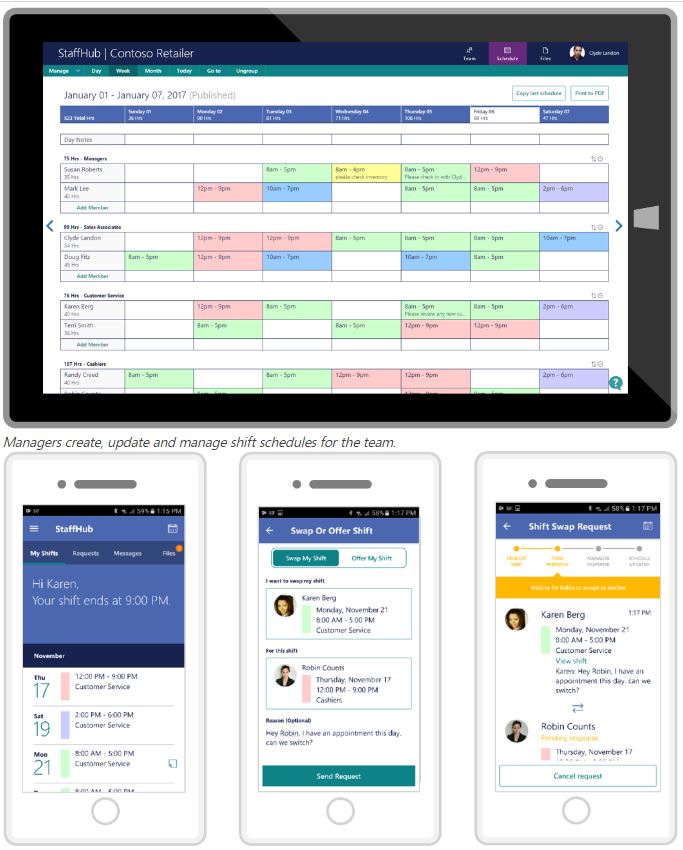
Microsoft Staff Hub is here! So what is it? Do you employ front line staff workers in your retail, hotel or restaurant business?  Microsoft Staff Hub is here and it’s made for you.   We know that these staff members don’t necessarily have their own office, desk or computer. Which can make it hard to access and share information important for the working day, week, month and beyond. Modernise the way you communicate on a professional level. Far too often, you and your workers rely on manual processes and outdated tools—cumbersome creation and printing of paper schedules, bulletin boards crammed with notes and a flurry of phone calls and text messages to cover shifts. Yes? If not, we applaud you! We really want to know what tech you use. If you do struggle and waste time. Keep reading. This new app could change your live for good! Rota, Schmota! Timetable mix ups will become a thing of the past! Staff Hub is a new scheduling app and online platform where you’ll be able to see staff changes, check shifts and reduce any mix ups or stress related conversations, easily and quickly. This means your staff could become happier – boosting business all round. Now who doesn’t want that? With Staff Hub you can create digital timetables that are automatically shared with your teams. And all members of the team will be able to check their shifts on their phone, any time, day or night. Shift swaps can also be managed on the platform.  Just open the app and send a request We think this sounds bliss. Take a look at the video below for more information. Virtual noticeboard – move over Facebook and WhatsApp – your staff will look at this more than any other app. If you still use notes pinned to notice boards as a method of communication – think again. With staffHub you will have a reliable way to distribute staff information. You can share news, training materials, documents, videos and more. Opening Team Conversations – Instant messaging to rival WhatsApp. Staff Hub isn’t just for management communications, either. Staff can instant message colleagues or the whole team. This means that team meetings and alerts can happen virtually. Meaning you’re connected when people are in or out of the venue. “How do I get started?” I hear you say! Staff Hub is available now for Office 365 customers with K1, E1, E3 and E5 membership. Want to find out more? Let us demo it for you! Once you install StaffHub you’ll never go back. Contact Us to find out more!

Think Cirrus Blog/Cluttered desktop
Blog

De-clutter your desk top and de-stress your life! 3 Helpful Tips to get you started.

Its June. Yes – we’ve got half way through 2017 and if you didn’t commit to any new year’s resolutions, now is the time to start. You never know, your mid-year resolutions (yeah, it’s a thing – start them today) could mean the rest of the year is the best yet! So, now seems like a better time than ever to rid your desktop of the ghosts of projects past. You know what I’m talking about – all those forgotten documents and miscellaneous screenshots that have been slowly taking over your screen for weeks and months, years even. Hoarding files on your desktop not only makes it challenging to locate what you need when you need it, but it can also compromise the speed of your computer. To help you keep your desktop tidy, we’ve come up with a few helpful tips. From creating a folder system to trying out a new desktop design, these suggestions are designed to help you re-discover yourself and stay productive in the process. Tips for Keeping Your Computer’s Desktop Clean & Organised 1) Create a folder system.  Be honest: How many files do you have on your desktop right now? 10? 20? 100? Have you lost count? If your desktop looks anything like the image above, you may want to start by moving everything into one folder to clear the air. Once you have your folders created, you can begin to divvy up your files. How you choose to organise your folder system will be dependent on your specific role. For example, I frequently write blog posts that contain a lot of visual examples. To simplify the process and keep a record of what I’ve included in the past, I’ve created two folders: Current Examples and Example Archive. When I’m rounding up examples for a new post from the web, I drop them in the Current Examples folder. This way, I can easily locate them when I go to write the post. Once the post is prepped and scheduled, I move the images to the Example Archive folder to make room for my next post. 2) Big virtual storage Solutions If you’re constantly dealing with managing and organising a lot of files, you may want to invest in an application like SharePoint, One Drive, Google Drive or even Dropbox to better manage your assets. The drives mentioned above are all file hosting services that offer cloud storage and file synchronisation solutions. Users can create a folder on their computers that syncs with the service, making it easy to access the content no matter what device you’re using. Rather than dragging everything onto your desktop, simply store it in SharePoint, Google Drive or Dropbox where you can quickly and easily search for it whenever you need it. You can also share folders with other users to create a central space for all of your shared files. This helps to prevent any bottlenecking that might occur when others are forced to wait on you to locate a specific file. Clean desktop. Organised files. It’s a win-win for everyone. 3) Schedule a weekly or monthly cleaning. As shown by the example above, it’s easy for your desktop to get kind of, well … scary. To ensure that you’re keeping up with desktop maintenance on a regular basis, set a recurring event on your calendar to remind you to get rid of anything unnecessary. This can be a weekly or monthly event, depending on how much damage you typically do. We also recommend scheduling this at the end of the day, as it serves as a great use of time when you’re starting to wrap up or lose focus.   We know that keeping your laptop or PC can be another annoying habit that you have to adopt. But, trust me – once you get into the routine – your life will become peachy. Worry less, stress less and become more efficient. Here at Think Cirrus – we want you to have an easier life – so all the things we’ve mentioned, go without saying, we’ll set these up for you. Which means one less thing to think about. We bring the attention to detail to life.

Think Cirrus/Social media security/barbwired fence
Blog

Social Media and Information Security: what is it and why is it important?

Information Security is an important part of our everyday lives and, you know what? I don’t think we even realised.  Over the last few months the NHS has been hit by significant cyber-crime and British Airways suffered a catastrophic I.T. meltdown due to neglect.  So, we know that it’s all too easy to forget how important it is to look after the tech and systems we use every day. Your tech is a vital asset and when looked after properly becomes priceless. So, whether you’re running a global airline business, a national health service or a small retail store in the city of Chester – it’s important to take your I.T. and information security seriously. One in five online consumers has been a victim of cybercrime in the past two years, according to McAfee (2011 statistics) and we’re sure those stats would have increased significantly over the last 6-7 years. Out of date software, licensing and the lack of funds to keep technology up to date are fast becoming contributing factors to reduced level of cyber security.  Social Networking Security Awareness  However – we also think that social networking is another direct link to the problem. While social networks allow you to keep in touch with family, friends and customers – there are several risks you should consider when using these networks. Here are a few pointers outlining what you need to be mindful of: Reputation Damage, Identity Theft and Physical Security When you’re online you should think about your online reputation management, the idea of identity theft, or physical security issues.  Using social networks platforms such as Twitter, Facebook, Telegram, and many others, means that you could post content that could potentially damage yourself and your business. Your profile could be hacked, your credentials could become compromised, or you could unknowingly invite burglars to your home by publishing your holiday pictures before you’re back in the country. So, whether you are using social media for business or personal use, be mindful of your actions. Suffering the consequences might cause more headaches than its worth.  Personal and Professional Responsibility Facebook faces a security challenge that few companies, or even governments, have ever faced: protecting more than 1 billion users of a service that is under constant attack.  You should always take “personal responsibility,” and that means you are ultimately responsible for protecting yourself.  Keep your guard up. Cybercriminals target Facebook frequently. Every time you click on a link, you should be aware of the risks. That goes for business accounts, including emails. Be wary of spam emails and links. Be careful about making personal information public. Sharing your mother’s name, your pet’s name, or your boyfriend’s name, for example, provides criminals with clues to guess your passwords. Links to spam and malware Technology can help make social networking more secure. The most common threats to Facebook users are links to spam and malware sent from compromised accounts. Consumers must be sure to have an active security software subscription, and not to let it lapse.      

Speak to an Expert
Book a Meeting ×
Scroll to Top