
Blog

Think Cirrus/young lady on mobile phone with a cup
Blog

Use FREE Guest Wi-Fi to Market your Venue! Find out how!

Offering free guest Wi-Fi can help with the marketing of your business like never before. You’ll get to understand who your customers are and entice them to visit  with personalised incentives, resulting in real benefits to your business and your customers. We can make your Wi-Fi work smarter, not harder for you. We can enable you to gather valuable data, drive email marketing campaigns, push notifications and we can even create splash pages. After speaking to organisers at the Coffee Shop Innovation show – we know the hot topic of 2017 is Wi-Fi Analytics. Tech in the hospitality industry is developing like never before.   You can make your Wi-Fi work smarter for you! Gather real-time visitor demographics Customised guest Wi-Fi data capture pages Monitor your Wi-Fi with cloud technologies Safe and secure login via social media.     Driving loyalty We support a number of venues with uber hipster interior design and working spaces. Which means that the coffee shops/venues are slowly and unknowingly becoming co-working spaces. We have recently helped the business owner track the number of entrepreneurs casually working in the venue, and as a result, we have helped to entice them to work in the venue more. The longer they stay on great Wi-Fi the more coffee they’ll purchase. The platforms we use with various partners will save customers details allowing you, as the business owner, to make the experience a personalised one. So, whenever they pop in, you’ll not only develop a face to face relationship, but a Wi-Fi one as well. Holistically, they’ll feel like they are working from home or even better – their own office. Which means they won’t have to continually log on every time they visit. In essence, we believe that making people’s lives easier and more comfortable will drive loyalty like never before. Harnessing the Power of Social Media  Social media is slowly becoming more popular then spending real time with friends. And even when you’re with friends, you’ll want to tell the world about it. Some of our clients have already learnt so much about their customers which has helped them to improve their marketing by 50%. They have been able to see customer analytics like never before, such as, age gender and location. We have a number of clients with multiple venues and they can see which venue is busy on which days just by the Wi-Fi analytics. As we’re in Chester, events at the Racecourse really open up our eyes to how many people are uploading to instagram or sending snap chats to their friends. As part of a wider marketing campaign this can really drive traffic to your venue, just when the party atmosphere is starting. Social Media Reviews – we know that your social reviews are just as good as word of mouth reviews – so by safely logging onto social media, your guests are already primed to give you a glowing review. Customised Guest Wi-Fi We work with partners such as Volare XP, and others depending upon your wants and needs. Together we’ll create data capture or splash pages like the one shown in the picture above. This means that your customers will feel secure knowing that they are logging onto your guest Wi-Fi and this will also mean that you can keep them up to date with everything that may be happening in your world, that they won’t want to miss. You’ll be able to gather stats and analytics about your guest’s behaviour like never before.

Think Cirrus/Cyber security/National cyber security centre
Blog

What can you do to combat cyber attacks?

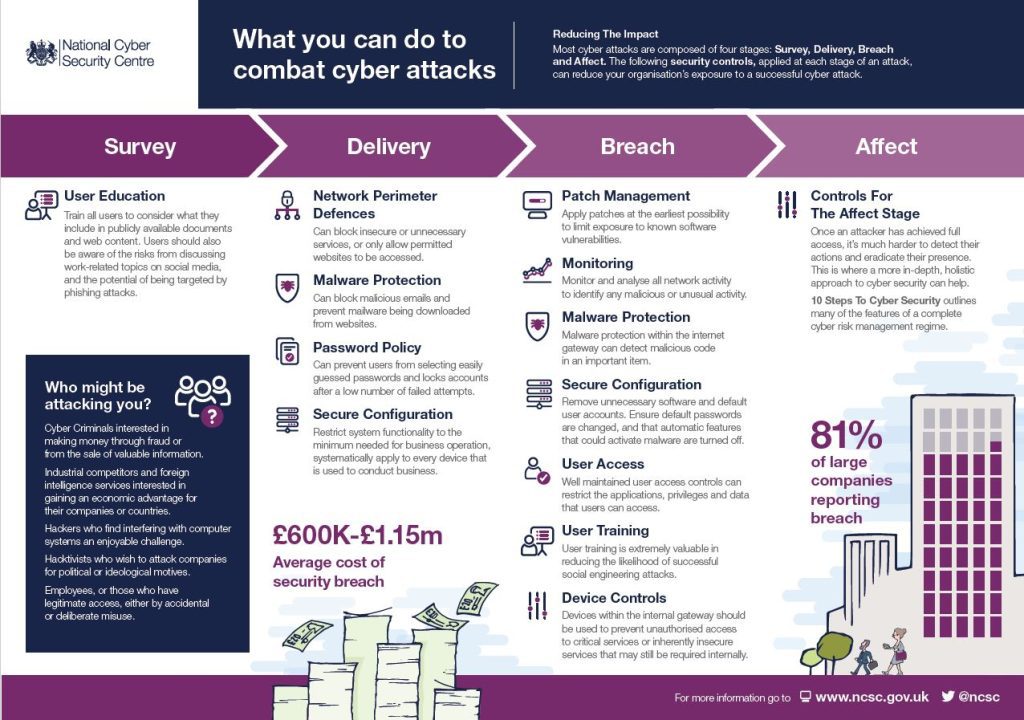
Cyber Security – Reducing the Impact According to the National Cyber Security Centre, most cyber-attacks are composed of four stages: Survey, Delivery, Breach and Affect. The following security controls, applied at each stage of an attack, can reduce your organisation’s exposure to a successful cyber-attack. We’ve used this handy guide as an outline for you to follow. See what you think. But first, a short paragraph on who might be attacking you… …Who might be attacking you? Cyber Criminals interested in making money through fraud or from the sale of valuable information. Industrial competitors and foreign intelligence services interested in gaining an economic advantage for their companies or countries. Hackers who find interfering with computer systems an enjoyable challenge.  Hacktivists who wish to attack companies for political or ideological motives.  Employees, or those who have legitimate access, either by accidental or deliberate misuse. So there are a number of reasons why your business could be targeted, how do you prevent an attack from happening. Because you should be thinking when, and not why. If you don’t take action, it’ll only be a matter of time before you experience an incident or an attack. SURVEY User Education You should look to train all users to consider what they include in publicly available documents and web content. Users should also be aware of the risks from discussing work-related topics on social media, and the potential of being targeted by phishing attacks DELIVERY Network Perimeter Defences – Make sure you can block insecure or unnecessary services, or only allow permitted websites to be accessed. Malware Protection – Make sure you can block malicious emails and prevent malware being downloaded from websites. Password Policy – Make sure you can prevent users from selecting easily guessed passwords and lock accounts after a small number of failed attempts. Secure Configuration – Always Restrict system functionality to the minimum needed for business operation, systematically apply to every device that is used to conduct business.   BREACH Patch Management – Apply patches at the earliest possibility to limit exposure to known software vulnerabilities. Monitoring – Monitor and analyse all network activity to identify any malicious or unusual activity. Malware Protection – Ensure that your malware protection within the internet gateway can detect malicious code in an important item.   Secure Configuration – Remove unnecessary software and default user accounts. Ensure default passwords are changed, and that automatic features that could activate malware are turned off. User Access – Ensure well maintained user access controls can restrict the applications, privileges and data that users can access. User Training – User training is extremely valuable in reducing the likelihood of successful social engineering attacks. Device Controls – Devices within the internal gateway should be used to prevent unauthorised access to critical services or inherently insecure services that may still be required internally.   AFFECT Controls for The Affect Stage Once an attacker has achieved full access, it’s much harder to detect their actions and eradicate their presence.  This is where a more in-depth, holistic approach to cyber security can help. We also came across this inspirational TED TALK by cyber security geek – James Lyne. Well worth a watch.

Think Cirrus/Blog/ Facebook security tips
Blog

Improving your Facebook security – just got easier!

On Wednesday, 31st May 2017, Facebook launched the re-design of the security settings page on everyone’s account and we think that it’s been a long time coming. Here, at Think Cirrus, security underpins everything we do and after reading all about it we’d like to go through an abridged version with you. They want all of your accounts to be secure, whether it’s Facebook or Outlook. So here is something you can do to ensure you’re safe and secure when updating friends and family on Facebook. According to Facebook: “Many people want to improve their security but simply don’t know where to begin.”  As a result, Facebook have moved things around a bit so they are more visible. Now, when you access your security settings page, you’ll see things like two-factor authentication and Trusted Contacts at the very top in a recommended section. These feature recommendations are customised to suit the needs of each person. So, if haven’t looked at these settings in a while – log out of Facebook and Google yourself. This is what people can see. And when I say people, I mean prospective employers, hackers, ex-partners, prospective new partners… anyway, you get my drift. Here a few things I’d recommend you do straight away: 1) Where you’re logged in I had to log out and in again because apparently, I was also logged in across other parts of Cheshire! Bad news! Or is it? Now that could be because I’ve done a bit of travelling – and the geolocation tracking measure isn’t a good indicator of where you are. A lot of the time it’s using the IP address of where your service provider is based. For example, the boss’ tablet is at his house in Chester but it’s saying he’s logged in, in Kent. So, here at Think Cirrus, we must be a little dubious – but we’re always cautious. So, we’ve just logged in and out to ensure that we’re only logged into the devices we’re using now. See picture below of the Security and Login page.   2) Change Password Truthfully, when was the last time you changed your password? And do you use this password for every other account you have? Have you ever shared your password with anyone at any time? If this is the case then I’d recommend you change your password… now? I changed mine last week after Facebook notified me that mu account may have been compromised. I was sat in the theatre – thinking that I had all my security settings enabled and filtered. But apparently, I had set all views of my account the public. 3) Setting up extra security Enable ‘Get Alerts about unrecognised logins’ – this means that if anyone logs in from a device or browsers you don’t normally use, you be notified and then in a better position to act – If any unusual activity were to be announced. Enable ‘Use two-factor authentication’ Two-factor authentication is a security feature that helps protect your Facebook account in addition to your password. If you set up two-factor authentication, you’ll be asked to enter a special security code or confirm your login attempt each time someone tries accessing Facebook from a computer or mobile device Facebook doesn’t don’t recognise. To turn on or manage two-factor authentication: Go to your Security and Login Settings by clicking  in the top-right corner of Facebook and clicking Settings > Security and Login. Scroll down to Use two-factor authentication and click Edit Choose the authentication method you want to add and follow the on-screen instructions Click Enable once you’ve selected and turned on an authentication method There are several authentication methods you can use with your Facebook account when logging in from an unrecognised computer or mobile device: Text message (SMS) codes from your mobile phone Security codes from Code Generator Tapping your security keyon a compatible device Security codes from a third party app Approving your login attempt from a device we recognize Using one of your printed recovery codes Keep in mind: You can use as many authentication methods as you’d like, but you need to have at least text message (SMS) codes turned on, or at least both a security key and Code Generator turned on. Other Useful Resources If you haven’t saved the computer or mobile device you’re using, you’ll be asked to do so when you turn on two-factor authentication. This way you won’t have to enter a security code when you log in again. Don’t click Save this browser if you’re using a public computer that other people can access (example: a library computer). Facebook needs to be able to remember your computer and browser information so Facebook can recognise it the next time you log in. Some browser features block this. If you’ve turned on private browsing or set up your browser to clear your history every time it closes, you might have to enter a code every time you log in.  

Think Cirrus/Blog/Microsoft Bookings app
Blog

Introducing Microsoft Bookings and frankly – we’re smitten! For small business, it shows efficiency at its best.

Microsoft Bookings makes it easier for small businesses to schedule and manage appointments with their customers. Last year, Microsoft released Microsoft Bookings to customers in the U.S. and Canada, introducing an easy way for small businesses to schedule and manage appointments with their customers. Microsoft have also rolled out the service to Office 365 Business Premium subscribers worldwide. The main features include: The ability to add your Office 365 calendar to Bookings, so that the times you are busy will automatically be blocked out on your public Booking page. The ability to add buffer time before and after your appointments—Do you need prep time before or after an appointment? Adding buffer time to a service automatically blocks that time in your Booking page too. Bookings apps for your iOS and Android phone—Now you can book an appointment, contact a customer or check a staff member’s appointments while away from the office. Being able to customize your Booking page—with more colour customisation options, so you can better personalise your Booking page. Spend less time scheduling Bookings gives you a quick and easy alternative to scheduling appointments over the phone. A customisable public webpage lets your customers find available times and book appointments 24/7. You get a private calendar for managing your schedule, and automatic confirmations and reminders that save time. Delight your customers Customers will love the flexibility, convenience, and control they get with Bookings. Booking online simplifies scheduling and cuts down on phone tag. And for those customers who prefer to call, you can enter information manually and all confirmations and reminders will be sent as usual. Try these sample booking pages to see what your customers will see when you start using Microsoft Bookings: Enjoy fewer missed appointments Reduce no-shows with automated reminders for customers and staff. Appointments appear on staff calendars as soon as they are made and are updated automatically. Customers can add appointments to personal calendars with just a few clicks. So, everyone knows where they need to be, and when. Manage bookings on the go Need to contact a customer about an appointment or reschedule on the fly? With the Bookings mobile app, you have full access to your customer, staff, and calendar info—where and when you need it. Use the app to easily email, call, or text customers, or create a new appointment with a few taps. Bookings is designed to delight your customers, simplify scheduling and free time for you to be on top of your business wherever you are. For more info – lets have a chat.    

Think Cirrus/Blog/Microsoft Bookings app
Blog

Microsoft Staff Hub is here!

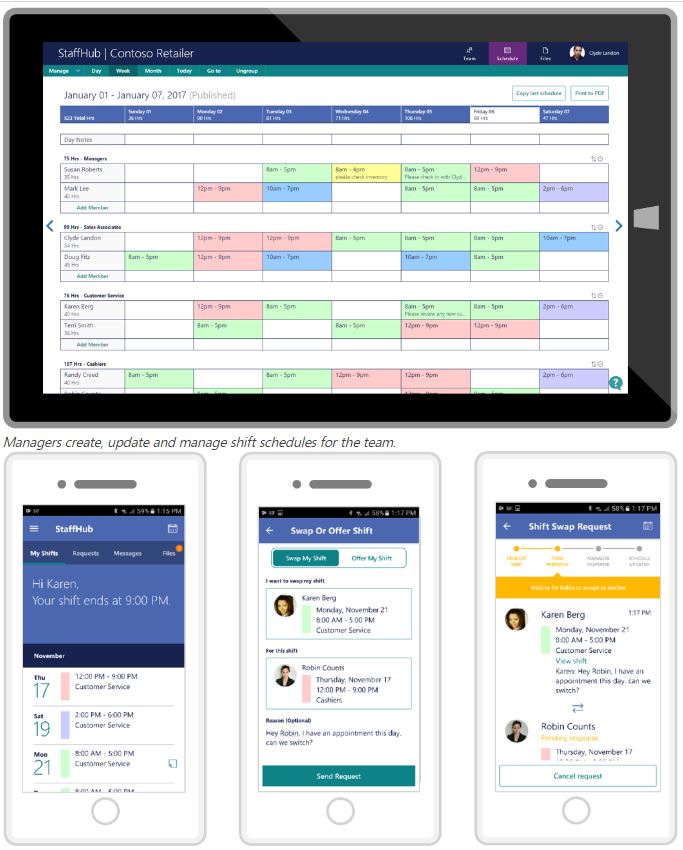
Microsoft Staff Hub is here! So what is it? Do you employ front line staff workers in your retail, hotel or restaurant business?  Microsoft Staff Hub is here and it’s made for you.   We know that these staff members don’t necessarily have their own office, desk or computer. Which can make it hard to access and share information important for the working day, week, month and beyond. Modernise the way you communicate on a professional level. Far too often, you and your workers rely on manual processes and outdated tools—cumbersome creation and printing of paper schedules, bulletin boards crammed with notes and a flurry of phone calls and text messages to cover shifts. Yes? If not, we applaud you! We really want to know what tech you use. If you do struggle and waste time. Keep reading. This new app could change your live for good! Rota, Schmota! Timetable mix ups will become a thing of the past! Staff Hub is a new scheduling app and online platform where you’ll be able to see staff changes, check shifts and reduce any mix ups or stress related conversations, easily and quickly. This means your staff could become happier – boosting business all round. Now who doesn’t want that? With Staff Hub you can create digital timetables that are automatically shared with your teams. And all members of the team will be able to check their shifts on their phone, any time, day or night. Shift swaps can also be managed on the platform.  Just open the app and send a request We think this sounds bliss. Take a look at the video below for more information. Virtual noticeboard – move over Facebook and WhatsApp – your staff will look at this more than any other app. If you still use notes pinned to notice boards as a method of communication – think again. With staffHub you will have a reliable way to distribute staff information. You can share news, training materials, documents, videos and more. Opening Team Conversations – Instant messaging to rival WhatsApp. Staff Hub isn’t just for management communications, either. Staff can instant message colleagues or the whole team. This means that team meetings and alerts can happen virtually. Meaning you’re connected when people are in or out of the venue. “How do I get started?” I hear you say! Staff Hub is available now for Office 365 customers with K1, E1, E3 and E5 membership. Want to find out more? Let us demo it for you! Once you install StaffHub you’ll never go back. Contact Us to find out more!

Think Cirrus Blog/Cluttered desktop
Blog

De-clutter your desk top and de-stress your life! 3 Helpful Tips to get you started.

Its June. Yes – we’ve got half way through 2017 and if you didn’t commit to any new year’s resolutions, now is the time to start. You never know, your mid-year resolutions (yeah, it’s a thing – start them today) could mean the rest of the year is the best yet! So, now seems like a better time than ever to rid your desktop of the ghosts of projects past. You know what I’m talking about – all those forgotten documents and miscellaneous screenshots that have been slowly taking over your screen for weeks and months, years even. Hoarding files on your desktop not only makes it challenging to locate what you need when you need it, but it can also compromise the speed of your computer. To help you keep your desktop tidy, we’ve come up with a few helpful tips. From creating a folder system to trying out a new desktop design, these suggestions are designed to help you re-discover yourself and stay productive in the process. Tips for Keeping Your Computer’s Desktop Clean & Organised 1) Create a folder system.  Be honest: How many files do you have on your desktop right now? 10? 20? 100? Have you lost count? If your desktop looks anything like the image above, you may want to start by moving everything into one folder to clear the air. Once you have your folders created, you can begin to divvy up your files. How you choose to organise your folder system will be dependent on your specific role. For example, I frequently write blog posts that contain a lot of visual examples. To simplify the process and keep a record of what I’ve included in the past, I’ve created two folders: Current Examples and Example Archive. When I’m rounding up examples for a new post from the web, I drop them in the Current Examples folder. This way, I can easily locate them when I go to write the post. Once the post is prepped and scheduled, I move the images to the Example Archive folder to make room for my next post. 2) Big virtual storage Solutions If you’re constantly dealing with managing and organising a lot of files, you may want to invest in an application like SharePoint, One Drive, Google Drive or even Dropbox to better manage your assets. The drives mentioned above are all file hosting services that offer cloud storage and file synchronisation solutions. Users can create a folder on their computers that syncs with the service, making it easy to access the content no matter what device you’re using. Rather than dragging everything onto your desktop, simply store it in SharePoint, Google Drive or Dropbox where you can quickly and easily search for it whenever you need it. You can also share folders with other users to create a central space for all of your shared files. This helps to prevent any bottlenecking that might occur when others are forced to wait on you to locate a specific file. Clean desktop. Organised files. It’s a win-win for everyone. 3) Schedule a weekly or monthly cleaning. As shown by the example above, it’s easy for your desktop to get kind of, well … scary. To ensure that you’re keeping up with desktop maintenance on a regular basis, set a recurring event on your calendar to remind you to get rid of anything unnecessary. This can be a weekly or monthly event, depending on how much damage you typically do. We also recommend scheduling this at the end of the day, as it serves as a great use of time when you’re starting to wrap up or lose focus.   We know that keeping your laptop or PC can be another annoying habit that you have to adopt. But, trust me – once you get into the routine – your life will become peachy. Worry less, stress less and become more efficient. Here at Think Cirrus – we want you to have an easier life – so all the things we’ve mentioned, go without saying, we’ll set these up for you. Which means one less thing to think about. We bring the attention to detail to life.

Think Cirrus/Social media security/barbwired fence
Blog

Social Media and Information Security: what is it and why is it important?

Information Security is an important part of our everyday lives and, you know what? I don’t think we even realised.  Over the last few months the NHS has been hit by significant cyber-crime and British Airways suffered a catastrophic I.T. meltdown due to neglect.  So, we know that it’s all too easy to forget how important it is to look after the tech and systems we use every day. Your tech is a vital asset and when looked after properly becomes priceless. So, whether you’re running a global airline business, a national health service or a small retail store in the city of Chester – it’s important to take your I.T. and information security seriously. One in five online consumers has been a victim of cybercrime in the past two years, according to McAfee (2011 statistics) and we’re sure those stats would have increased significantly over the last 6-7 years. Out of date software, licensing and the lack of funds to keep technology up to date are fast becoming contributing factors to reduced level of cyber security.  Social Networking Security Awareness  However – we also think that social networking is another direct link to the problem. While social networks allow you to keep in touch with family, friends and customers – there are several risks you should consider when using these networks. Here are a few pointers outlining what you need to be mindful of: Reputation Damage, Identity Theft and Physical Security When you’re online you should think about your online reputation management, the idea of identity theft, or physical security issues.  Using social networks platforms such as Twitter, Facebook, Telegram, and many others, means that you could post content that could potentially damage yourself and your business. Your profile could be hacked, your credentials could become compromised, or you could unknowingly invite burglars to your home by publishing your holiday pictures before you’re back in the country. So, whether you are using social media for business or personal use, be mindful of your actions. Suffering the consequences might cause more headaches than its worth.  Personal and Professional Responsibility Facebook faces a security challenge that few companies, or even governments, have ever faced: protecting more than 1 billion users of a service that is under constant attack.  You should always take “personal responsibility,” and that means you are ultimately responsible for protecting yourself.  Keep your guard up. Cybercriminals target Facebook frequently. Every time you click on a link, you should be aware of the risks. That goes for business accounts, including emails. Be wary of spam emails and links. Be careful about making personal information public. Sharing your mother’s name, your pet’s name, or your boyfriend’s name, for example, provides criminals with clues to guess your passwords. Links to spam and malware Technology can help make social networking more secure. The most common threats to Facebook users are links to spam and malware sent from compromised accounts. Consumers must be sure to have an active security software subscription, and not to let it lapse.      

Think Cirrus/BA IT Meltdown/aircraft
Blog

If British Airways’ IT can go down – so can yours!

The catastrophic IT meltdown which caused chaos for thousands of passengers across the bank holiday wasn’t the first-time British Airways had technical issues this year. Which begs the question – they could have seen it coming and put prevention tactics in place? Right? …In this article, we’ll look at what could go wrong in your business – we want you to think differently about your IT. Reported amongst the trade and wider press, British Airways shook up their I.T. department in a bid to save on staffing costs. They have now been branded as ‘greedy’ – experts say that if they hadn’t made internal I.T. staff redundant then the damaging crash may not have happened. Well – we’ll never really know. Regardless of what is to blame, the cost of the bank holiday weekend outage is likely to be more than £100m. Independent aviation analyst Howard Wheeldon even suggested that the bill could be close to £250m, when compensation claims are considered. British Airways was forced to cancel all flights out of Heathrow and Gatwick airports in London on Saturday following what it described as a “global systems outage”. This IT disaster just shows that if a global business such as British Airways can’t avoid such a catastrophe – then, potentially your business could go through such trauma too. What lessons have we learnt from BA’s I.T. blip? Here we’ll point out the top lessons learnt: 1. Disaster Recovery Plan – If you fail to prepare for the worst, prepare to fail. The importance of a disaster recovery plan cannot be overstated. Regardless of industry, when an unforeseen event takes place and brings day-to-day operations to a halt, your business needs to recover as quickly as possible and continue to provide services to your clients. From data security breaches to natural disasters, you must put a plan in place in case of a catastrophe. Not having a disaster recovery plan in place can put the organisation at risk of high financial costs, reputation loss and even greater risks for its clients and customers. Disaster recovery forms a big part of a company’s business continuity plan. While business continuity sets out controls to keep all aspects of business functioning when a disaster hits, disaster recovery primarily focuses on IT and its systems that support business functions in the case of a disaster. The importance of disaster recovery is becoming more and more of a top agenda point for Chief Executives and Business Owners, as we continue to depend on computer systems. Systems and networks are becoming ever more complex, meaning more and more things can go wrong. Over a decade ago, if there was a threat to a system, a disaster recovery plan may include powering down the mainframe and other computers. Current systems tend to be too complicated to have more of a hands-on approach. It has been reported that many large companies spend between 2% to 4% of their IT budget on disaster recover planning. It is also not unusual for a company to spend up to 25% of their IT budget. The plan is to minimise the risk of significant loss to infrastructure. Lack of preparation can lead to significant monies and time being spent on repair. However – if you don’t have those sorts of budgets to contend with, then there are other options. Traditional Disaster Recovery solutions are very expensive and quite often require duplication of pricey hardware that in an ideal world would never be required. Find out more about a robust and cost effective backup solution. One of our specialists can help you understand the solution including the costs to your business: https://www.thinkcirrus.co.uk/our-solutions/recovery-testing/ 2. Outsourcing doesn’t have to be a negative decision – choose wisely and you’ll be better off. As the owner of a small company, you have probably entertained the thought of outsourcing some aspect of your business. The benefits of outsourcing seem obvious, touted by experts across numerous industries as the answer to cutting costs for business functions ranging from information technology to accounting, marketing and human resources; it seems possible that you could run an entire company without ever hiring a single employee. Just think – you may have someone in your office that is ok with computers, but is most likely fixing I.T. issues that isn’t on the job description. If they are spending time taking care of these things, who is doing what they were hired to do? Outsourcing allows you to retain employees for their highest and best use, rather than wasting their time on things that may take them longer than someone who is trained in these specific areas. We also think that outsourcing can improve company focus. It is neither practical, nor possible to be a jack of all trades. Outsourcing lets you focus on your core competencies while another company focuses on theirs. Outsourcing also helps you to reduce risk – keeping up with technology required to run your business is expensive and time consuming… just think about it – you know it makes sense. Because professional outsourced IT providers work with multiple clients and need to keep up on industry best practices, they typically know what is right and what is not. This kind of knowledge and experience dramatically reduces your risk of implementing a costly wrong decision. See – it’s not all doom and gloom! And any associated risks such as loss of control or confidentiality of data and disaster recovery – so if you have an IT representative in your business who knows what they are doing or you source a company that is open and honest – you can avoid any costly or business damaging risks. We know there is a lot to think about, so whether you choose to outsource or hire internally, one thing is certain, you must know how to manage successful working relationships with your IT service providers. Let’s face it, we know that we’re not always the easiest people in the world to understand

Think Cirrus/One drive blog/one drive logo cloud
Blog

I.T Novice? Beginners Guide to SharePoint and One Drive

I.T. sometimes seems really complicated – and it can be if you’re not sure how to go about it. It’s like the cloud. If you don’t know what this is – it can sound scary and complicated. In this short blog, we’ll go over how SharePoint and One Drive cloud solution can transform your business. What is the Cloud? The Cloud is IT infrastructure and software that’s connected to the Internet. This allows us to access our IT from anywhere.   With Office 365, your files and apps are accessible in a public (but very secure) cloud. And you can collaborate with teammates anywhere. The Microsoft platforms that make this possible are called OneDrive and SharePoint. ONEDRIVE CLOUD STORAGE? What is it? Why do I need it? OneDrive is the cloud-based file storage system that comes with Office 365. In the simplest terms, OneDrive gives you: FILE STORAGE – safe & secure space on a remote server run by Microsoft. This means reduced costs and easily accessible files. EASY ACCESS TO FILES – a OneDrive app will sync your files between your PC or other devices, and the cloud. This removes the hassle and ball ache when it comes to saving files into a drive. You’ll be able to access files from any other device, whether in the office or working remotely. DATA SECURITY –  the Azure cloud platform that OneDrive is built on, means that you are safe and secure, as standard. ONEDRIVE!! One Vision to change the way you work! If you are a small business, you really don’t need to worry about an impressive server. With Office 365, Microsoft manages your files and data security for you. This means you don’t need to spend a lot on buying, managing and upgrading servers. Instead you can spend a smaller monthly amount on a service that’s always up to date. If you are an entrepreneur and need to access your files on the go, without the worry of losing everything if your laptop dies, then One Drive can help with a stress free working life.  There are OneDrive apps for PC, Mac, and mobile. So, instead of having to be in the office to open files on your own server, you can sign into OneDrive (or Office 365 apps) and work on them anywhere. You can also email your files from anywhere. Running your business properly and within regulation isn’t easy. One Drive helps your business comply with data regulations –  Microsoft’s cloud already meets stringent EU standards. The UK and US governments even use it. WHAT IS SHAREPOINT COLLABORATION? SharePoint is the bridge between your OneDrive files and your Office 365 apps (e.g. Word, Excel, and PowerPoint). SharePoint lets multiple members of your team collaborate on the same file, in different locations. Let’s try an example. Anito and Lee are writing a Word doc together in separate offices. SharePoint help Lee and Anito work together: One file can be opened by two users, instead of opening separate versions of the same file. Which means they can manage version control and operate more efficiently. SharePoint synchronises their work, so they can see each other type and share comments in real time When finished, Lee and Anito save one version of the file and email it to their boss When their boss wants to add comments to the doc, he can access that one centralised version too. In other words, everyone always has the latest version of every file. As you can see, collaborating and file sharing are a lot more flexible and efficient with SharePoint. There’s more… …Searching for documents across a business can be tricky and normally ends up in duplicated work. With eDiscovery, it is easier to search and find content across your entire business. There are also other tools such as Microsoft Planner – we use this at Think Cirrus and highly recommend it. Microsoft Planner is a project management tool that has been developed by Microsoft and comes as part of SharePoint suite. SharePoint also has the facility to develop an internal communications platform such as an intranet – even greater Manchester Police use it to communicate.   You can develop SharePoint to create and collaborate blogs, intranet sites, and more Why do it yourself! Focus on your business and let us sort it out! We know that you have your own business to run – but you needed to have some background knowledge, so you feel like you’re in the know. However, there is always plenty more questions you can ask.  Don’t be afraid – we’ll even meet you for a coffee and some cake if you’re in the local area, with no obligation.

Think Cirrus/recovery testing/disaster main/monitor with chart on
Blog

Top tips for improving your broadband connection speed

There is nothing more annoying than your broadband suddenly slowing down when you have a busy venue full of customers, chatting, posting, sharing and snapchatting. Not only that, you know only too well that your payments systems will start to slow down too, because everything is running over the Wi-F. Here’s how you can bring things back up to speed. Frustrated by slow broadband? Average fixed broadband speeds have risen dramatically over the last five years, with the UK’s average download speed hitting 14.7Mbps. But the unfortunate truth is that many people in the country still suffer from slow download speeds – particularly at peak times. Sometimes there is very little you can do about this. If your business is a significant distance your local telephone exchange, for example, and you still have a copper connection, then you are doomed to suffer slow speeds until better alternatives become available. However, if your phone lines are capable of delivering faster broadband speeds than you are getting, there are several DIY tricks you can use to improve your chances of getting a faster signal. Test your speed If you haven’t already done so, use a speed tester to measure the level at which your broadband connection is currently running. This will allow you to see what difference the following suggestions make to your speed. Reposition your router The position of your router can have a significant effect on the quality of your wireless connection. Place it in an area where the signal will be affected by as few obstructions and little interference as possible. For example, away from appliances which emit wireless signals (e.g. cordless phones, baby monitors) and avoiding barriers (such as walls and doors) between the router and your computer. Ideally, it should be positioned up high – on a bookshelf for example. Check your Wi-Fi settings Your router has lots of different settings that can affect your wireless broadband signal that can be tweaked and adjusted to help get the best speeds. For example, making sure you use a different wireless channel to your neighbours can reduce interference and drop speeds for both of you. Check your manual for instructions on how to adjust these settings. Expand your wireless network If you’re having trouble with wireless, you could invest in a wireless repeater. These improve your wireless range, bouncing the signal over a larger area. You could also add a powerline adapter. These use the wiring in your house to send a Wi-Fi signal around. Wherever you have a free plug socket, you’ll be able to position a wireless hotspot. This is a significantly more expensive option, but is often much more effective. Switch After all these measures, if your current package still isn’t giving you the speed you want, it may be time to switch provider. Use an Ofcom-accredited comparison calculator to compare broadband deals and find a more suitable package for you. It’s good to talk If you are not getting what you expected from your ISP, then give them a call. You may be able to boost your connection speed simply by asking them if they can identify a fault on the line, taking steps to fix it for you. Alternatively, if you’ve been on the same package for a long time – 12 months or more – your package might be outdated. Not only may faster options be available, you may be paying more than you need to. It’s up to you which of those is worse. Alternatively – lets have a chat.  Sometimes trying to resolve an I.T. issue yourself can be a bit of a ball ache. Why not give us a call and we’ll give you free advice and guidance on what you need to do next. As the small business I.T. experts we’ve experienced your problems and feel your pain.

Speak to an Expert
Book a Meeting ×
Scroll to Top