
July 2017

Think Cirrus/young lady on mobile phone with a cup
Blog

Use FREE Guest Wi-Fi to Market your Venue! Find out how!

Offering free guest Wi-Fi can help with the marketing of your business like never before. You’ll get to understand who your customers are and entice them to visit  with personalised incentives, resulting in real benefits to your business and your customers. We can make your Wi-Fi work smarter, not harder for you. We can enable you to gather valuable data, drive email marketing campaigns, push notifications and we can even create splash pages. After speaking to organisers at the Coffee Shop Innovation show – we know the hot topic of 2017 is Wi-Fi Analytics. Tech in the hospitality industry is developing like never before.   You can make your Wi-Fi work smarter for you! Gather real-time visitor demographics Customised guest Wi-Fi data capture pages Monitor your Wi-Fi with cloud technologies Safe and secure login via social media.     Driving loyalty We support a number of venues with uber hipster interior design and working spaces. Which means that the coffee shops/venues are slowly and unknowingly becoming co-working spaces. We have recently helped the business owner track the number of entrepreneurs casually working in the venue, and as a result, we have helped to entice them to work in the venue more. The longer they stay on great Wi-Fi the more coffee they’ll purchase. The platforms we use with various partners will save customers details allowing you, as the business owner, to make the experience a personalised one. So, whenever they pop in, you’ll not only develop a face to face relationship, but a Wi-Fi one as well. Holistically, they’ll feel like they are working from home or even better – their own office. Which means they won’t have to continually log on every time they visit. In essence, we believe that making people’s lives easier and more comfortable will drive loyalty like never before. Harnessing the Power of Social Media  Social media is slowly becoming more popular then spending real time with friends. And even when you’re with friends, you’ll want to tell the world about it. Some of our clients have already learnt so much about their customers which has helped them to improve their marketing by 50%. They have been able to see customer analytics like never before, such as, age gender and location. We have a number of clients with multiple venues and they can see which venue is busy on which days just by the Wi-Fi analytics. As we’re in Chester, events at the Racecourse really open up our eyes to how many people are uploading to instagram or sending snap chats to their friends. As part of a wider marketing campaign this can really drive traffic to your venue, just when the party atmosphere is starting. Social Media Reviews – we know that your social reviews are just as good as word of mouth reviews – so by safely logging onto social media, your guests are already primed to give you a glowing review. Customised Guest Wi-Fi We work with partners such as Volare XP, and others depending upon your wants and needs. Together we’ll create data capture or splash pages like the one shown in the picture above. This means that your customers will feel secure knowing that they are logging onto your guest Wi-Fi and this will also mean that you can keep them up to date with everything that may be happening in your world, that they won’t want to miss. You’ll be able to gather stats and analytics about your guest’s behaviour like never before.
Think Cirrus/Cyber security/National cyber security centre
Blog

What can you do to combat cyber attacks?

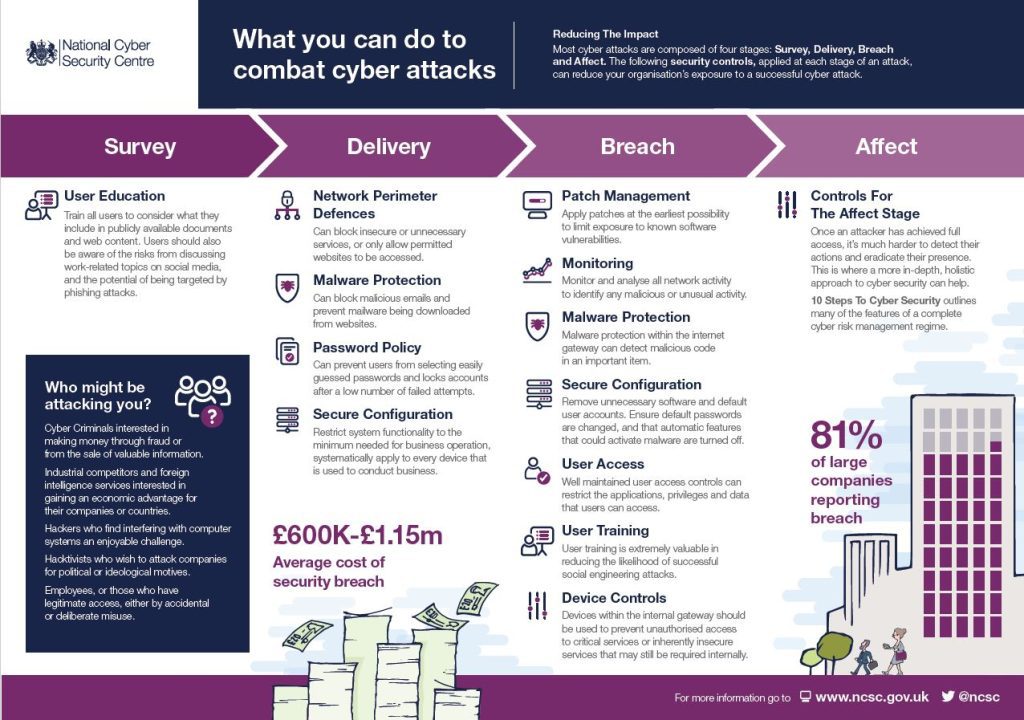
Cyber Security – Reducing the Impact According to the National Cyber Security Centre, most cyber-attacks are composed of four stages: Survey, Delivery, Breach and Affect. The following security controls, applied at each stage of an attack, can reduce your organisation’s exposure to a successful cyber-attack. We’ve used this handy guide as an outline for you to follow. See what you think. But first, a short paragraph on who might be attacking you… …Who might be attacking you? Cyber Criminals interested in making money through fraud or from the sale of valuable information. Industrial competitors and foreign intelligence services interested in gaining an economic advantage for their companies or countries. Hackers who find interfering with computer systems an enjoyable challenge.  Hacktivists who wish to attack companies for political or ideological motives.  Employees, or those who have legitimate access, either by accidental or deliberate misuse. So there are a number of reasons why your business could be targeted, how do you prevent an attack from happening. Because you should be thinking when, and not why. If you don’t take action, it’ll only be a matter of time before you experience an incident or an attack. SURVEY User Education You should look to train all users to consider what they include in publicly available documents and web content. Users should also be aware of the risks from discussing work-related topics on social media, and the potential of being targeted by phishing attacks DELIVERY Network Perimeter Defences – Make sure you can block insecure or unnecessary services, or only allow permitted websites to be accessed. Malware Protection – Make sure you can block malicious emails and prevent malware being downloaded from websites. Password Policy – Make sure you can prevent users from selecting easily guessed passwords and lock accounts after a small number of failed attempts. Secure Configuration – Always Restrict system functionality to the minimum needed for business operation, systematically apply to every device that is used to conduct business.   BREACH Patch Management – Apply patches at the earliest possibility to limit exposure to known software vulnerabilities. Monitoring – Monitor and analyse all network activity to identify any malicious or unusual activity. Malware Protection – Ensure that your malware protection within the internet gateway can detect malicious code in an important item.   Secure Configuration – Remove unnecessary software and default user accounts. Ensure default passwords are changed, and that automatic features that could activate malware are turned off. User Access – Ensure well maintained user access controls can restrict the applications, privileges and data that users can access. User Training – User training is extremely valuable in reducing the likelihood of successful social engineering attacks. Device Controls – Devices within the internal gateway should be used to prevent unauthorised access to critical services or inherently insecure services that may still be required internally.   AFFECT Controls for The Affect Stage Once an attacker has achieved full access, it’s much harder to detect their actions and eradicate their presence.  This is where a more in-depth, holistic approach to cyber security can help. We also came across this inspirational TED TALK by cyber security geek – James Lyne. Well worth a watch.

Think Cirrus/Blog/ Facebook security tips
Blog

Improving your Facebook security – just got easier!

On Wednesday, 31st May 2017, Facebook launched the re-design of the security settings page on everyone’s account and we think that it’s been a long time coming. Here, at Think Cirrus, security underpins everything we do and after reading all about it we’d like to go through an abridged version with you. They want all of your accounts to be secure, whether it’s Facebook or Outlook. So here is something you can do to ensure you’re safe and secure when updating friends and family on Facebook. According to Facebook: “Many people want to improve their security but simply don’t know where to begin.”  As a result, Facebook have moved things around a bit so they are more visible. Now, when you access your security settings page, you’ll see things like two-factor authentication and Trusted Contacts at the very top in a recommended section. These feature recommendations are customised to suit the needs of each person. So, if haven’t looked at these settings in a while – log out of Facebook and Google yourself. This is what people can see. And when I say people, I mean prospective employers, hackers, ex-partners, prospective new partners… anyway, you get my drift. Here a few things I’d recommend you do straight away: 1) Where you’re logged in I had to log out and in again because apparently, I was also logged in across other parts of Cheshire! Bad news! Or is it? Now that could be because I’ve done a bit of travelling – and the geolocation tracking measure isn’t a good indicator of where you are. A lot of the time it’s using the IP address of where your service provider is based. For example, the boss’ tablet is at his house in Chester but it’s saying he’s logged in, in Kent. So, here at Think Cirrus, we must be a little dubious – but we’re always cautious. So, we’ve just logged in and out to ensure that we’re only logged into the devices we’re using now. See picture below of the Security and Login page.   2) Change Password Truthfully, when was the last time you changed your password? And do you use this password for every other account you have? Have you ever shared your password with anyone at any time? If this is the case then I’d recommend you change your password… now? I changed mine last week after Facebook notified me that mu account may have been compromised. I was sat in the theatre – thinking that I had all my security settings enabled and filtered. But apparently, I had set all views of my account the public. 3) Setting up extra security Enable ‘Get Alerts about unrecognised logins’ – this means that if anyone logs in from a device or browsers you don’t normally use, you be notified and then in a better position to act – If any unusual activity were to be announced. Enable ‘Use two-factor authentication’ Two-factor authentication is a security feature that helps protect your Facebook account in addition to your password. If you set up two-factor authentication, you’ll be asked to enter a special security code or confirm your login attempt each time someone tries accessing Facebook from a computer or mobile device Facebook doesn’t don’t recognise. To turn on or manage two-factor authentication: Go to your Security and Login Settings by clicking  in the top-right corner of Facebook and clicking Settings > Security and Login. Scroll down to Use two-factor authentication and click Edit Choose the authentication method you want to add and follow the on-screen instructions Click Enable once you’ve selected and turned on an authentication method There are several authentication methods you can use with your Facebook account when logging in from an unrecognised computer or mobile device: Text message (SMS) codes from your mobile phone Security codes from Code Generator Tapping your security keyon a compatible device Security codes from a third party app Approving your login attempt from a device we recognize Using one of your printed recovery codes Keep in mind: You can use as many authentication methods as you’d like, but you need to have at least text message (SMS) codes turned on, or at least both a security key and Code Generator turned on. Other Useful Resources If you haven’t saved the computer or mobile device you’re using, you’ll be asked to do so when you turn on two-factor authentication. This way you won’t have to enter a security code when you log in again. Don’t click Save this browser if you’re using a public computer that other people can access (example: a library computer). Facebook needs to be able to remember your computer and browser information so Facebook can recognise it the next time you log in. Some browser features block this. If you’ve turned on private browsing or set up your browser to clear your history every time it closes, you might have to enter a code every time you log in.  

Speak to an Expert
Book a Meeting ×
Scroll to Top